Download and Install.
Whether you want to try BlueNote Lights on only one or two computers, or are ready to add it to all your computers to let everyone in your practice begin communicating immediately, here’s what will happen when you Download: Your web browser will display the BlueNoteSetup.exe file in a place where you can then click on it to begin the installation process. Then you will run the Installer, Launch BlueNote, and Confirm or Change your BlueNote User Name.
Download and Install BlueNote Lights wherever communication is needed in your office. BlueNote is designed to find other users on your network automatically after you download. BlueNote does not typically need to be installed on your server.
No Credit Card Required
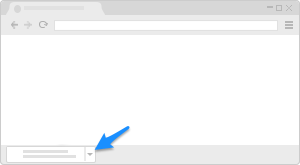
Chrome, Brave
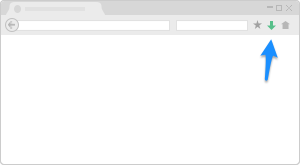
Firefox
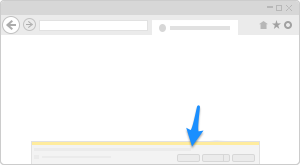
Microsoft Edge or Explorer
If you are a current customer and have a paid license, please click here to download a compatible version of BlueNote.
Questions?
No Credit Card or payment is required for our free trial.
BlueNote Communicator Lights is not a cloud-based application or a subscription service. Instead, it is an app that is downloadable to Windows PCs and tablets (not Mac OS compatible).
The only difference between the Paid and Trial version is the trial's time limit. All features are included in the trial; however, some features, such as Remote, GoNotifications and Plus, will require an additional trial registration code.
Power up with BlueNote
People work smarter when they are given protocols that are easy to follow, all day, every day. The BlueNote Communicator Lights "command center" takes the form of a simple computer program that blends the best of walkie-talkies, light panels, pagers, and online chat. It is free to use for 30 days in each practice, and when implemented, BlueNotes make sure that immediate patient and provider needs are being communicated between team members on their PC computers, watches, and even iPads. We offer complimentary training and setup directly with office staff so that the BlueNote Light Panel is precisely customized for the way they want to practice.
Subject to the End User License Agreement (EULA), BlueNote Software grants you a non-exclusive, limited license to install the trial version of BlueNote Lights in your office for evaluation purposes. The trial version of BlueNote is provided on an "as-is" basis. This license will terminate when the trial period expires or when you purchase a permanent license, whichever happens first. BlueNote Software reserves the right to terminate your trial period at any time. Trial versions of BlueNote are time-limited and can include all paid features for your evaluation.
BlueNote Software
HIPAA Secure intra-office communication software built for healthcare. Thousands of practices rely on BlueNote daily to keep team members moving.
Company
Resources
Products
Our software is designed, crafted and built with ♡ in Texas by BlueNote Software